
1. Introduction
Back in my university physics lab, we were always looking for ways to make theory more hands-on. That’s when I first discovered the magic of Arduino starter kits for physics experiments. Instead of just talking about Newton’s laws or thermal changes, we could measure them, right there on the bench.
Today there are dozens of Arduino physics kits out there – from sample boards with a few LEDs to Arduino starter kits with sensors for physics that can track acceleration, temperature, or even magnetic fields.
Honestly, if you’re a teacher, a student, or just a curious maker, starting with a beginner Arduino kit for physics labs will open a whole new world.
In this guide, I’ll walk you through the best Arduino kit to teach physics—one that I’ve tested or seen in real classrooms. We’ll look at what’s inside, how they can help with experiments like measuring gravity or exploring electromagnetism, and which kits are worth your budget.
2. What is Arduino and How Does It work?
The first time I saw an Arduino board was 15 years ago; honestly, I’m not even sure which year it was. I think second year of university? We were in the electronics lab, and one of my classmates had this small blue thing with a USB port and—well—lots of tiny pins on the side. “This is an Arduino,” he said. I didn’t get what was so special. But then he plugged in a sensor, uploaded something from his laptop, and suddenly a little LED started blinking exactly when we moved our hands in front of it.
So, Arduino in simple terms? It’s kind of like a small, programmable brain for electronics. Technically, it’s an open-source microcontroller platform. You connect it to sensors—temperature probes, accelerometers, even magnetic field detectors—then write a bit of code (there’s free software for that) to make it do something with the data.
For example, with beginner Arduino kits for physics experiments, you could:
- measure the swing of a pendulum and see real-time graphs
- track how temperature changes during a thermal expansion experiment
- explore electromagnetism by detecting tiny changes in a magnetic field
The process is pretty straightforward: connect your sensor, write the instructions, upload them through a USB cable… and that’s it. Affordable Arduino physics starter kits make it surprisingly easy to get real measurements without needing fancy lab equipment. Whether you’re teaching high school science projects or just curious about building your own motion tracker, Arduino opens up a lot of possibilities—and it’s way more fun than reading formulas in a book.
3. Why Arduino is Great for Physics Experiments
Well… you know, the first time I got an Arduino board, I kind of didn’t know what to do with it. Just a tiny board, some LEDs, a couple of wires… looked like a toy, really. But then, I guess one day in the lab, we tried measuring a little rolling cart’s acceleration using a sensor from a beginner Arduino kit for physics experiments, and wow—seeing the numbers pop up on the screen as the cart moved? I was hooked. Newton’s laws suddenly made sense. Honestly, way more than just staring at a textbook.
And here’s the thing. Arduino starter kits for physics experiments aren’t just some gadgets—they actually make physics hands-on. Even a small kit can help you track temperature changes, motion, or magnetic fields. You see it, you touch it, you measure it. It’s kind of magical, you know?
Plus, they’re really affordable. Traditional lab equipment for experiments like measuring gravity or exploring electromagnetism can cost a fortune. But Arduino physics starter kits? Budget-friendly, and still accurate enough to give real results.
Another thing I love is flexibility. Start simple, then add sensors or modules later. Need an accelerometer to track motion? A Hall effect sensor for magnetism? Many Arduino kits for high school labs let you do exactly that. And you don’t need to be an engineer. You can still do advanced experiments once you get the hang of it.
And the feedback is instant. Pendulum swings, temperature changes, motor speeds—you see it all happening live. That immediacy makes physics actually feel alive, which is way better than reading formulas in a notebook.
So yeah… if you’re checking out Arduino kits for physics experiments, or hunting for the best Arduino starter kits for physics experiments, these kits make abstract concepts real. You can touch them, play with them, experiment—learning becomes, well, fun.ing a lot more engaging.
4. Buying Guide & Product Reviews for Arduino Physics Kits
Okay… so you’re probably thinking, which Arduino kit should I actually get for physics experiments? I remember the first time I had to pick one—I was totally overwhelmed. There are so many kits, you know? Some have just LEDs and buzzers, while others come with a bunch of sensors.
Honestly, for beginner Arduino kits for physics experiments, I’d pick one that has temperature sensors, accelerometers, and maybe a Hall effect sensor. That way, you can do experiments with motion, electromagnetism, and even thermal stuff. Makes things way more fun than just reading about it.
And here’s a tip: make sure it works with your computer. Most kits are fine on Windows, Mac, or Linux, but some have extra apps or software that can be a headache. So, check that before you buy.
Now, about the price thing. Cheap kits are tempting, but sometimes spending a little more gets you Arduino physics starter kits with extra sensors and longer-lasting components. I mean, it’s kind of worth it if you really want to try different experiments.
Also, look for community support. Some kits have online tutorials, sample experiments, and forums. Totally helpful, especially if you’re a teacher or a student just starting out.
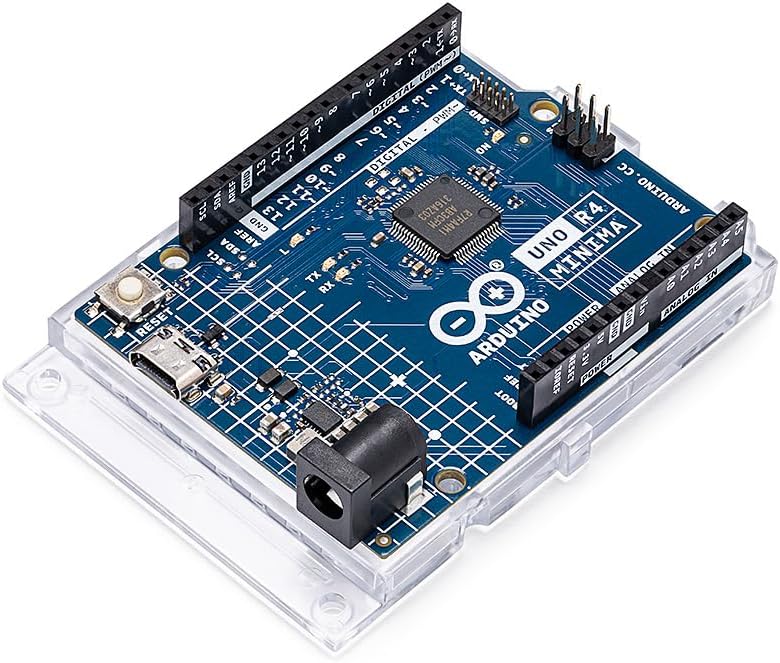
4.1. Arduino UNO R4 Minima [ABX00080] – Compact Powerhouse for Physics Labs
Believe it or not, the first time I picked up the Arduino UNO R4 Minima, I thought, “This tiny board can’t possibly do much.” But once I plugged it in, connected a simple accelerometer, and watched the numbers pop up on my screen as the cart rolled down the ramp, I was hooked. That’s the magic of Arduino starter kits for physics experiments—you don’t just read about motion or temperature changes, you actually see them happen.
This upgraded version of the classic UNO comes with a 32-bit processor, 32 KB of RAM, and 256 KB of storage, making it surprisingly capable for its size. For anyone starting their journey with beginner Arduino kits for physics experiments, the UNO R4 Minima is a rock-solid choice. And yes, the USB-C port isn’t just convenient—it’s oddly satisfying to plug in and watch everything sync instantly.
Key Advantages:
- Powerful 32-bit processor with ample memory, perfect for more advanced or data-heavy physics experiments.
- Multiple connectivity options: USB-C, CAN, UART, I2C, and SPI—so hooking up sensors like accelerometers, temperature probes, or magnetic field detectors is a breeze.
- Affordable (~$19.99) yet incredibly versatile, making it a favorite among students, teachers, and makers exploring Arduino physics starter kits.
Drawbacks:
- No built-in Wi-Fi, so if you want wireless experiments, you’ll need an extra module.
- Some older Arduino libraries may require updates due to the newer architecture—but honestly, that’s a small price to pay for all the extra power.
Affiliate Link:
This model typically costs around $19.99, but prices may vary — check it on Amazon.
4.2. Arduino UNO R4 WiFi [ABX00087] – Powerful Dual-Core Board for Wireless Physics Experiments
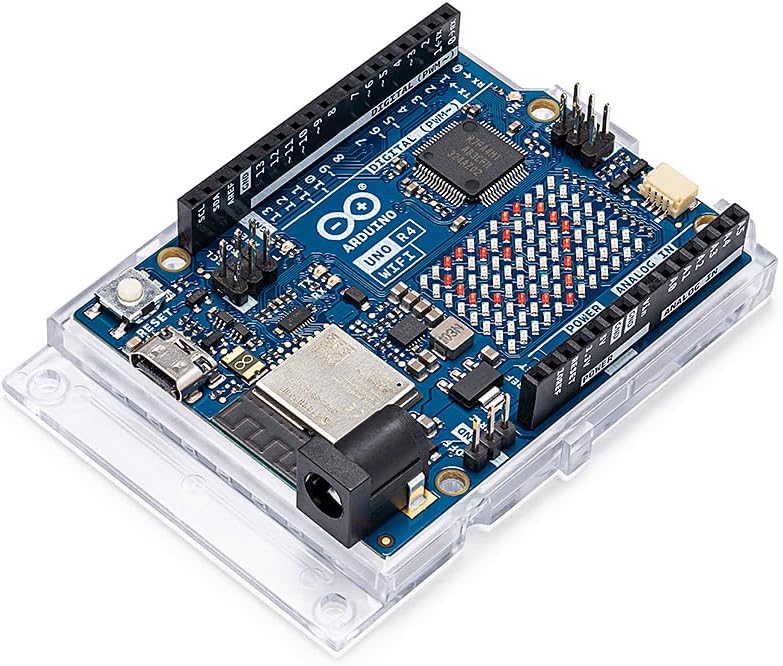
Honestly, when I first saw the Arduino UNO R4 WiFi, I thought, “Wow, this looks like a serious upgrade.” And it really is. Combining the Renesas RA4M1 microcontroller (ARM Cortex-M4) with the ESP32-S3 Wi-Fi/Bluetooth chip, this board packs dual-core processing power that can handle everything from real-time data tracking to wireless physics experiments. For anyone exploring best Arduino starter kits for physics experiments, it’s a dream—especially if you want to experiment with IoT, motion sensing, or edge AI concepts.
Setting it up is surprisingly smooth. The Wi-Fi and Bluetooth 5.0 connectivity makes it effortless to link sensors, smart devices, or cloud platforms. I remember testing a temperature sensor and an accelerometer together while streaming the data live to my laptop—it just worked, no fuss, no delays. And the USB-C port? That little click when it connects never gets old; coding and uploading sketches feels almost magical.
Key Advantages:
- Dual-core Renesas RA4M1 + ESP32-S3 processor for high-speed and wireless physics experiments.
- Built-in Wi-Fi and Bluetooth 5.0 for seamless IoT connectivity and remote data handling.
- Modern USB-C, CAN, and Qwiic connector—hook up I2C sensors, control devices, or integrate into industrial projects with ease.
- 12-bit DAC and integrated OP-AMP for precise analog output—perfect for audio or sensor-intensive experiments.
- Integrated 12×8 LED Matrix for dynamic visual feedback, messages, or real-time data display.
Drawbacks:
- Slightly higher price (~$27.50) compared to simpler boards.
- Some beginners might find the dual-core architecture overwhelming at first—but honestly, once you start experimenting, it becomes intuitive.
Affiliate Link:
This model typically costs around $27.50, but prices may vary — check it on Amazon.
4.3. Arduino Nano ESP32 with Headers [ABX00083] – Compact and Powerful for Wireless Physics Experiments
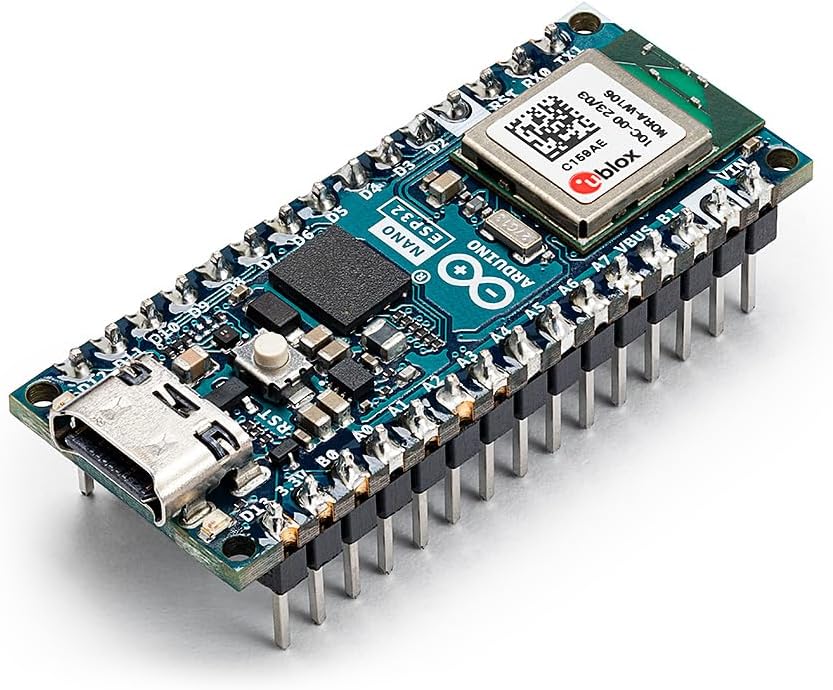
Honestly, the Arduino Nano ESP32 surprised me the first time I used it. It’s tiny, but don’t let its size fool you—the ESP32-S3 microcontroller packs a dual-core 32-bit processor running up to 240 MHz. For anyone diving into best Arduino starter kits for physics experiments, this little board is a powerhouse for real-time data tracking, wireless communication, and even edge AI experiments.
Connecting sensors and devices is a breeze thanks to built-in Wi-Fi and Bluetooth 5.0. I once set up a mini motion experiment with an accelerometer and a temperature sensor, and the Nano ESP32 streamed the data to my laptop without a hitch. The USB-C port makes programming and powering the board smooth and hassle-free—definitely a welcome upgrade over older micro-USB boards.
Key Advantages:
Dual-core ESP32-S3 processor: handles advanced physics experiments and real-time data with ease.
Reliable Wi-Fi and Bluetooth 5.0: seamless wireless connectivity for IoT, remote sensors, or interactive experiments.
USB-C port: makes programming smoother and powering the board stable.
HID support: integrates with keyboards, mice, and other input devices—perfect for creating interactive or experimental setups.
MicroPython compatible: ideal for rapid prototyping, educational projects, and anyone who prefers Python over C/C++.
Here’s the thing: even though the Nano ESP32 is small, it feels surprisingly sturdy. Connecting multiple sensors didn’t make it fussy, and watching the tiny LED blink while data streamed made me feel like I was really in a professional lab. It’s the kind of board that makes beginners excited and keeps experienced makers interested.
Drawbacks:
16 GB onboard storage is decent, but very large datasets might need external storage.
With so many features, newcomers might feel a little overwhelmed at first—but honestly, diving in hands-on clears that up fast.
Affiliate Link:
This model typically costs around $20.90, but prices may vary —check it on Amazon.
Conclusion
You know what was funny? The first time I shoved a tiny accelerometer onto my Arduino UNO R4 Minima, I didn’t think much would happen. Seriously. But then… boom! Numbers started jumping on my screen, and I couldn’t stop grinning. I remember leaning back and thinking, “Okay, this is actually pretty cool.”
And here’s the thing—when I set up a little pendulum with the Nano ESP32, the graph updated in real-time. The LEDs blinked right when I expected them to. Suddenly, acceleration, gravity, motion—it all clicked in my head. I found myself nudging the sensors, tweaking the setup, laughing a little when something went wrong, and honestly just having fun with science.
It’s playful, it’s hands-on, and it sticks. Messing with the setup, seeing live graphs, blinking LEDs, swapping sensors—it’s not just learning; it’s a mini-adventure in physics. You touch it, you see it, you experiment, and somehow it sinks in way better than staring at formulas in a book ever could.
Honestly, whether it’s the compact UNO R4 Minima, the dual-core UNO R4 WiFi, or the versatile Nano ESP32, each board gives you a new way to interact with physics. You don’t need a fancy lab—just a board, a few sensors, and a laptop. Watching data appear, LEDs blink, and setups respond in real-time is pure magic.
So, if you’ve ever wanted to bring physics off the page and into your hands, these Arduino starter kits are the way to do it. Pick one, hook up a sensor, play around, and watch your experiments—and your understanding—come alive.
Call to Action (CTA)
Honestly, why wait? Grab one of these Arduino starter kits today and start experimenting. Hook up a sensor, watch the LEDs blink, see your data live on the screen, and get that “aha!” moment when physics finally makes sense.
Whether it’s the UNO R4 Minima for beginners for simple experiments, the dual-core UNO R4 WiFi for wireless projects, or the Nano ESP32 for compact experiments, each board has something unique to offer. Play, tinker, and learn—your experiments don’t just stay on paper anymore. Click the links, pick your kit, and turn your physics ideas into real, hands-on discoveries.
FAQ – Best Arduino Starter Kits for Physics Experiments
Q1: Which Arduino starter kit should I pick if I’m completely new to physics experiments?
Honestly, I started with the UNO R4 Minima, and it was surprisingly fun. I didn’t know what to expect, but hooking up the first sensor and seeing live data on my screen was kind of magical. For beginners, it’s compact, affordable, and gives you everything you need for basic motion, temperature, or simple electromagnetism experiments.
Q2: Can I do wireless projects with these kits?
Oh, absolutely! I played around with the UNO R4 WiFi and loved how it handled Wi-Fi and Bluetooth connections. Whether you want to track a remote sensor, control LEDs from your phone, or experiment with IoT setups, this kit makes it surprisingly easy.
Q3: Is the Nano ESP32 good for more advanced or compact setups?
Totally! The Nano ESP32 blew me away. I once set up a tiny experiment to log motion data, and it just worked. With MicroPython support and HID capabilities, it’s perfect if you want to try smaller, interactive experiments or even start dabbling in wireless physics projects.
Q4: Do I need coding skills to get started?
Not really. I had minimal coding experience when I began, and the tutorials plus example projects got me going in no time. The kits are beginner-friendly, but once you feel comfortable, you can start tweaking code and sensors for more advanced physics experiments.
Q5: Where’s the easiest place to buy these Arduino starter kits?
I usually grab them online—it’s quick and convenient. You can check the prices and pick your kit via these affiliate links: